HellouOne reads how each customer feels as they write and shows it where you work: next to the contact's name, in the conversation list and in Reports → Sentiment. You can see who is getting upset before they leave, which conversations your team turned around, and what sentiment says about your CSAT and your speed.
It is available on plans that include AI classifications. Administrators see the report; agents see sentiment in their conversations. If your plan includes it and you don't see anything yet, contact support to switch it on for your account.
In the conversation list
Each card shows a coloured dot at the top, next to the inbox name (on an account with a single inbox, or while the list shows a single inbox, the name is hidden and the dot sits on its own):
- Green: positive.
- Grey: neutral.
- Yellow: negative or annoyed.
- Orange: frustrated.
- Red: hostile, or a conversation that needs attention with no other reading.
When a conversation needs attention, the dot gets a pulsing red ring. Hover over the dot to see the detail (phones have no hover tooltip), for example: Sentiment: Hostile · Needs attention · High urgency · Wants a person.
A conversation needs attention when the customer is frustrated or hostile, has high urgency, asked for a person, is at risk of leaving or uses abusive language.
Inside a conversation
Next to the contact's name you'll see:
- The sentiment chip (for example Hostile or Positive), with an arrow ↗ when the conversation is improving and ↘ when it is getting worse.
- The priority chip. Tap it to change the priority without leaving the conversation: None, Urgent, High, Medium or Low.
Sentiment updates by itself with every customer message; there is nothing to do.
Reports → Sentiment
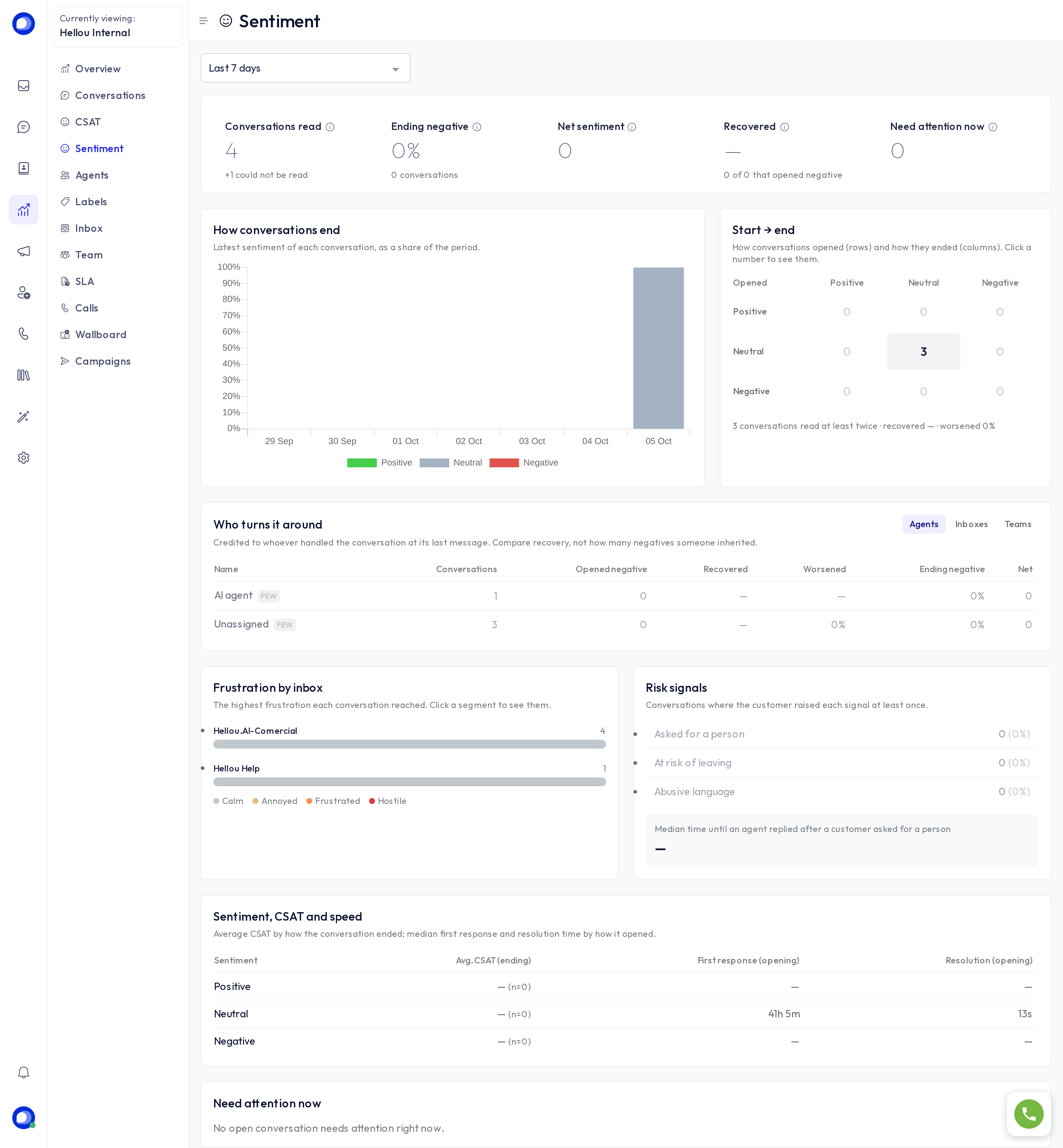
Open Reports → Sentiment and pick the period. Each conversation counts once, by its latest reading, however many messages it had.
The figures at the top
- Conversations read: how many conversations could be read in the period.
- Ending negative: the share of customers who leave unhappy.
- Net sentiment: the percentage ending positive minus the percentage ending negative, from -100 to +100.
- Recovered: of the conversations that opened negative, how many ended neutral or positive. Only conversations read at least twice count.
- Need attention now: open or pending conversations that need someone right now; it does not depend on the period you pick.
How conversations end
A chart of each conversation's latest sentiment, by day (or by week, month or year over long periods), so you can see whether this week is going better or worse than the last.
Start → end
A table of how conversations opened (rows) and how they ended (columns), for conversations read at least twice. Green cells got better, red ones worse. Click any number to see those conversations and open them.
Who turns it around
The breakdown by Agents, Inboxes or Teams. Each conversation is credited to whoever handled it at its last message, the AI agent included, and those nobody handled show as Unassigned (those two rows only appear under Agents).
Compare the Recovered column rather than how many negative conversations someone received: whoever takes the hard cases will always inherit more negatives. Rows marked Few have fewer than 10 conversations, too few to compare.
Frustration by inbox
The highest frustration each conversation reached (Calm, Annoyed, Frustrated, Hostile), per inbox. Click a segment to see those conversations.
Risk signals
How many customers asked for a person, were at risk of leaving or used abusive language, and the median time until an agent replied after someone asked for a person.
Sentiment, CSAT and speed
Average CSAT by how the conversation ended, and median first response and resolution time by how it opened. It shows you, for example, whether customers who arrive upset wait longer than the rest.
Need attention now
The list of open or pending conversations that need attention right now, whatever the period, with a link to open each one.
Act automatically
An automation rule can raise the priority or notify a team when a conversation needs attention. See the Automations and macros article for ready-to-copy recipes.
Ask LIA
LIA can sum up your account's sentiment. For example: "How did conversations end this month?" or "Which agent recovers the most negative conversations?"
Privacy
Sentiment is read from the customer's new messages, the conversation's channel and up to 3 earlier messages, your team's replies included. Before they are sent, emails, phone numbers, links, social handles and document numbers are hidden. The customer's name and contact details are never sent.